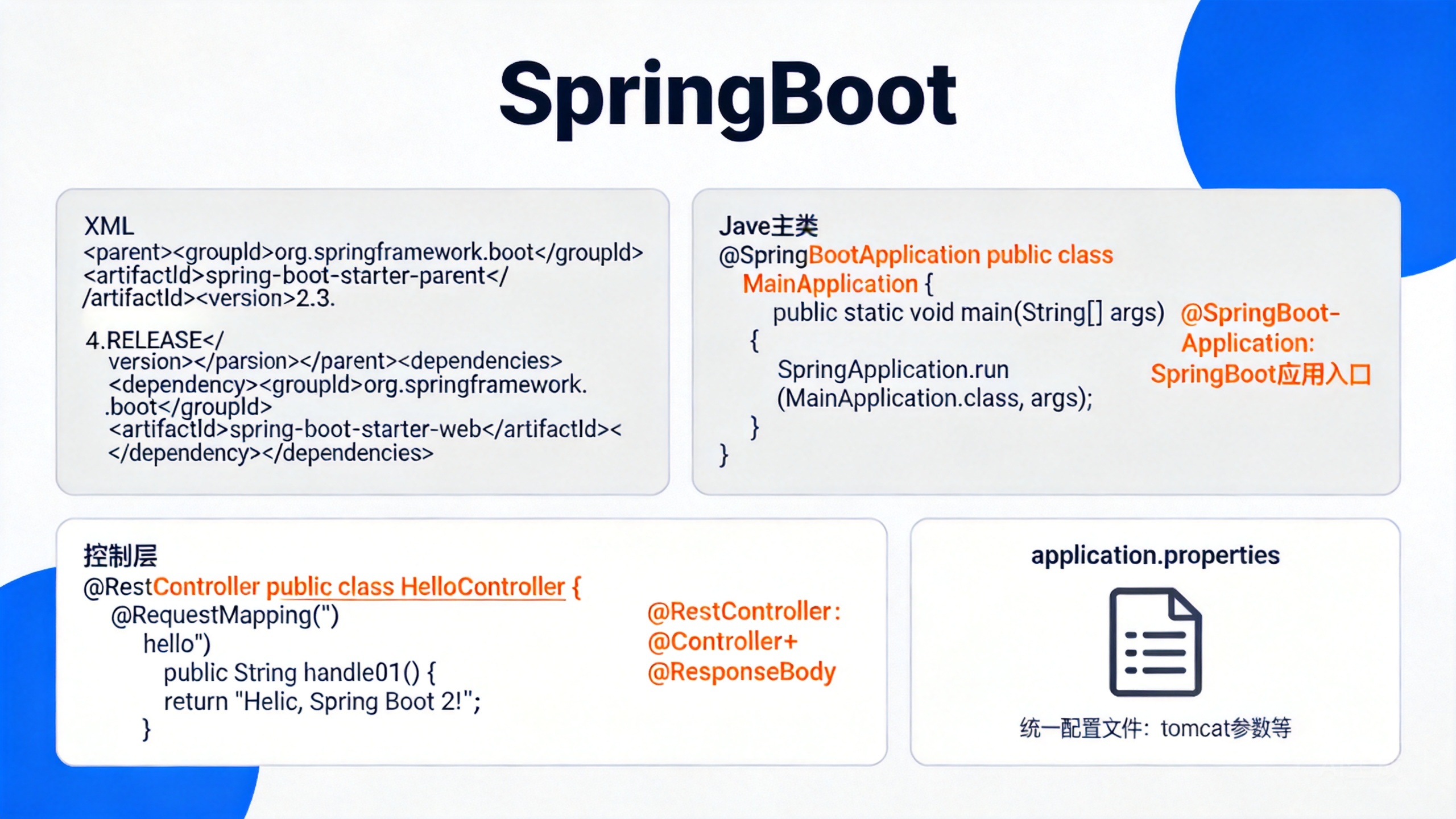

1 SpringBoot2入门
1.1 导入依赖
<parent>
    <groupId>org.springframework.boot</groupId>
    <artifactId>spring-boot-starter-parent</artifactId>
    <version>2.3.4.RELEASE</version>
</parent>

<dependencies>
    <dependency>
        <groupId>org.springframework.boot</groupId>
        <artifactId>spring-boot-starter-web</artifactId>
    </dependency>
</dependencies>
1.2 编写主类
@SpringBootApplication
public class MainApplication {
    public static void main(String[] args) {
        SpringApplication.run(MainApplication.class, args);
    }
}
@SpringBootApplication这个注解表示这是一个SpringBoot应用,主方法形式固定,是整个SpringBoot的入口
1.3 控制层
@RestController
public class HelloController {
    @RequestMapping("/hello")
    public String handle01() {
        return "Hello, Spring Boot 2!";
    }
}
@RestController注解可以看成是@Controller和@ResponseBody的结合,其余与SpringMVC类似
1.4 配置文件
SpringBoot提供了统一的配置文件,可以用来配置tomcat的参数,其名称为application.properties
#application.properties
server.port=8888
配置参数可见官方文档
1.5 打包方式
SpringBoot可以直接打成jar包,无需打成war包放到服务器运行
1.5.1 导入依赖
<build>
    <plugins>
        <plugin>
            <groupId>org.springframework.boot</groupId>
            <artifactId>spring-boot-maven-plugin</artifactId>
        </plugin>
    </plugins>
</build>
1.5.2 设置打包方式为jar包
<packaging>jar</packaging>
2 SpringBoot的特点
2.1 SpringBoot的依赖管理机制
我们可以看到,在SpringBoot中,我们引入了SpringBoot的父依赖,然后引入Starter-web依赖:
<parent>
    <groupId>org.springframework.boot</groupId>
    <artifactId>spring-boot-starter-parent</artifactId>
    <version>2.3.4.RELEASE</version>
</parent>

<dependencies>
    <dependency>
        <groupId>org.springframework.boot</groupId>
        <artifactId>spring-boot-starter-web</artifactId>
    </dependency>
</dependencies>
parent:子项目继承父项目的依赖,作用:依赖管理
spring-boot-starter-parent存在父项目:
<parent>
    <groupId>org.springframework.boot</groupId>
    <artifactId>spring-boot-dependencies</artifactId>
    <version>2.3.4.RELEASE</version>
</parent>
他几乎声明了所有开发中常用的依赖的版本号,我们无需关注版本号,自动版本仲裁
- 引入依赖默认都可以不写版本
- 引入非版本仲裁的jar(spring-boot-dependencies中没有声明的依赖),要写版本号。
- 可以自定义修改默认版本号
修改默认版本号可以在properties里重写配置(基于Maven的就近优先原则)
<properties>
	<mysql.version>8.0.26</mysql.version>
</properties>
- 在SpringBoot中我们可以见到很多类似于
spring-boot-starter-*的样式,*表示某种场景,这个场景的所有常规需要的依赖我们都自动引入,SpringBoot支持的场景可以见官方文档。 - 若是
*-spring-boot-starter格式的则是第三方为我们提供的简化开发的场景启动器。
所有场景启动器最底层的依赖为:
<dependency>
    <groupId>org.springframework.boot</groupId>
    <artifactId>spring-boot-starter</artifactId>
    <version>2.3.4.RELEASE</version>
    <scope>compile</scope>
</dependency>
2.2 自动配置
在SpringBoot中,由于我们使用的是web场景的开发,他会自动引入tomcat、Spring、SpringMVC的依赖
<dependency>
    <groupId>org.springframework.boot</groupId>
    <artifactId>spring-boot-starter-tomcat</artifactId>
    <version>2.3.4.RELEASE</version>
    <scope>compile</scope>
</dependency>
<dependency>
    <groupId>org.springframework</groupId>
    <artifactId>spring-web</artifactId>
    <version>5.2.9.RELEASE</version>
    <scope>compile</scope>
</dependency>
<dependency>
    <groupId>org.springframework</groupId>
    <artifactId>spring-webmvc</artifactId>
    <version>5.2.9.RELEASE</version>
    <scope>compile</scope>
</dependency>
因此我们只需要配置Tomcat即可使用(application.properties)
- 各种配置拥有默认值,默认配置最终都是映射到某个类上,配置文件的值最终会绑定每个类上,这个类会在容器中创建对象
SpringBoot的主方法中SpringApplication.run(MainApplication.class, args)会返回一个IOC容器ConfigurableApplicationContext该容器包含了当前应用的所有组件,我们可以获取所有组件
@SpringBootApplication
public class MainApplication {
    public static void main(String[] args) {
        ConfigurableApplicationContext run = SpringApplication.run(MainApplication.class, args);
        String[] names = run.getBeanDefinitionNames();
        for (String name : names) {
            System.out.println(name);
        }
    }
}
可以看到里面整合了我们SpringMVC等的一些常用组件
dispatcherServlet
characterEncodingFilter
multipartResolver
。。。。。
SpringBoot帮我们配置好了所有Web开发的常见场景,引入了哪些场景,这个场景的自动配置才会开启
另外,SpringBoot配有自动扫描机制,采用默认结构:即主程序所在的包以及其所有子包里面的组件都会被默认扫描进来
若是需要在主包外的地方配置扫描组件,有两种方法
- 在@SpringBootApplication注解下有一个参数scanBasePackages,可以配置扫描的包
@SpringBootApplication(scanBasePackages="com.adrainty") - @ComponentScan 指定扫描路径
@ComponentScan("com.adrainty.boot")
3 容器功能
3.1 容器添加组件
3.1.1 @Configuration注解
@Configuration
public class MyConfig {
    @Bean
    public User user01(){
        return new User("zhangsan", 18);
    }
}
防止Spring配置文件繁琐的操作,SpringBoot提供了@Configuration注解,该注解表明该类是一个配置类,等同与配置文件
@Bean标签表示给容器添加组件,以方法名作为组件的id,返回值作为组件类型。返回的值,就是组件在容器中的实例
@SpringBootApplication
public class MainApplication {
    public static void main(String[] args) {
        ConfigurableApplicationContext run = SpringApplication.run(MainApplication.class, args);

        //从容器中获取组件
        Pet tomcat = run.getBean("tomcatPet", Pet.class);
        System.out.println(tomcat);
    }
}
- 注册的主键默认是单实例的,每个@Bean方法被调用多少次返回的组件都是单实例的
- 配置类本身也是一个主键
Bean中有属性proxyBeanMethods,默认是true,若改为false,配置类在文件中不会保存代理对象,若在容器中一个组件无需调用另外一个组件,可以将该属性设置为false,可以加快启动速度
3.1.2 Spring中的组件
Spring中的@Bean、@Component、@Controller、@Service、@Repository照样还能使用
3.1.3 @ComponentScan注解
@ComponentScan可以指定包扫描的路径,如:
@SpringBootApplication(scanBasePackages="com.adrainty")
若不指定,默认扫描主程序所在的包以及其所有子包里面的组件
3.1.4 @Import注解
@Import可以写在任意组件上,我们可以通过@Import组件,给容器导入组件
可以自动调用导入组件的无参构造器,创造出组件类型的对象,默认组件的名字就是全类名
// MyConfig.class
@Import({Pet.class})
@Configuration
public class MyConfig {
    @Bean
    public User user01(){
        return new User("zhangsan", 18);
    }
}

// MainApplication.class
@SpringBootApplication
public class MainApplication {
    public static void main(String[] args) {
        ConfigurableApplicationContext run = SpringApplication.run(MainApplication.class, args);
        Object pet = run.getBean(Pet.class);
        System.out.println(pet);
    }
}
3.1.5 @Conditional组件
条件装配:满足Conditional指定的条件,则进行组件注入

例如ConditionalOnBean,当容器中存在某些组件时,才工作等等
@ConditionalOnBean(name = "tom")
@Bean
public User user01(){
    return new User("zhangsan", 18);
}
3.2 原生配置文件引入
@ImportResource注解可以导入原生配置文件,不需要一个一个的添加@Bean标签
@ImportResource("classpath:beans.xml")
public class MyConfig {}
3.3 配置绑定
3.3.1 @ConfigurationProperties注解
使用@ConfigurationProperties注解可以将配置文件与Bean对象进行绑定
如下示例,propeties文件中配置了两个与类对象相关的值,在Bean对象中使用@ConfigurationProperties注解,将配置文件与Bean对象绑定,其中prefix指类里面的每一个属性,与配置文件中哪一个前缀一一绑定。接着使用@Component将该类标为组件,需要注意,只有在容器中的组件,才会拥有SpringBoot提供的强大功能,例如配置绑定功能。
// Car.java
@Component
@ConfigurationProperties(prefix = "mycar")
public class Car {
    private String brand;
    private Integer price;
}
mycar.brand=CNY
mycar.price=100000
另外一种方法是不写@Component注解将该类表示为组件,而在配置类中开启组件配置绑定,采用@EnableConfigurationProperties注解。需要注意的是,@EnableConfigurationProperties只能些在配置类中。@EnableConfigurationProperties作用有:
- 开启配置绑定功能
- 把组件自动注册到容器中
// Car.java
@ConfigurationProperties(prefix = "mycar")
public class Car {
    private String brand;
    private Integer price;
}

// MyConfig.java
@Configuration
@EnableConfigurationProperties(Car.class)
public class MyConfig {}
4 自动配置原理入门
4.1 引导加载自动配置类
在我们主程序配置注解时候使用了@SpringBootApplication注解,它为一些注解的合成注解
@SpringBootConfiguration
@EnableAutoConfiguration
@ComponentScan(
    excludeFilters = {@Filter(
    type = FilterType.CUSTOM,
    classes = {TypeExcludeFilter.class}
), @Filter(
    type = FilterType.CUSTOM,
    classes = {AutoConfigurationExcludeFilter.class}
)}
)
public @interface SpringBootApplication {...}
4.1.1 @SpringBootConfiguration注解
@Configuration
public @interface SpringBootConfiguration {...}
@SpringBootConfiguration代表当前是一个配置类
4.1.2 @ComponentScan注解
@ComponentScan指定扫描哪些,Spring注解;
4.1.3 @ComponentScan注解
@AutoConfigurationPackage
@Import({AutoConfigurationImportSelector.class})
public @interface EnableAutoConfiguration {...}
@EnableAutoConfiguration注解为两个注解的合成
其中,@AutoConfigurationPackage表示自动配置包,指定包规则
@Import({Registrar.class})
public @interface AutoConfigurationPackage {...}
它给容器中导入Register,利用Registrar给容器中导入一系列组件
static class Registrar implements ImportBeanDefinitionRegistrar, DeterminableImports {
        Registrar() {
        }

        public void registerBeanDefinitions(AnnotationMetadata metadata, BeanDefinitionRegistry registry) {
            AutoConfigurationPackages.register(registry, (String[])(new AutoConfigurationPackages.PackageImports(metadata)).getPackageNames().toArray(new String[0]));
        }

        public Set<Object> determineImports(AnnotationMetadata metadata) {
            return Collections.singleton(new AutoConfigurationPackages.PackageImports(metadata));
        }
    }
AnnotationMetadata相当于注解的源信息(@AutoConfigurationPackage)代表这个注解标在哪里,值是什么

然后得到包名,将包下的所有组件导入进来,因此默认的包路径是主程序所在的包
然后**@Import({AutoConfigurationImportSelector.class})**
其中有一个方法,是获得所有需要导入的配置,转成String数组返回,即利用getAutoConfigurationEntry(annotationMetadata);给容器中批量导入一些组件
protected AutoConfigurationImportSelector.AutoConfigurationEntry getAutoConfigurationEntry(AnnotationMetadata annotationMetadata) {
    if (!this.isEnabled(annotationMetadata)) {
        return EMPTY_ENTRY;
    } else {
        AnnotationAttributes attributes = this.getAttributes(annotationMetadata);
        List<String> configurations = this.getCandidateConfigurations(annotationMetadata, attributes);
        configurations = this.removeDuplicates(configurations);
        Set<String> exclusions = this.getExclusions(annotationMetadata, attributes);
        this.checkExcludedClasses(configurations, exclusions);
        configurations.removeAll(exclusions);
        configurations = this.getConfigurationClassFilter().filter(configurations);
        this.fireAutoConfigurationImportEvents(configurations, exclusions);
        return new AutoConfigurationImportSelector.AutoConfigurationEntry(configurations, exclusions);
    }
}
其中,List<String> configurations = this.getCandidateConfigurations(annotationMetadata, attributes);列出了所有候选的组件。

然后利用工厂加载 Map<String, List<String>> loadSpringFactories(@Nullable ClassLoader classLoader);得到所有的组件
Enumeration<URL> urls = classLoader != null ? classLoader.getResources("META-INF/spring.factories") : ClassLoader.getSystemResources("META-INF/spring.factories");
从META-INF/spring.factories位置来加载一个文件。默认扫描我们当前系统里面所有META-INF/spring.factories位置的文件
spring-boot-autoconfigure-2.3.4.RELEASE.jar包里面也有META-INF/spring.factories
# Auto Configure
org.springframework.boot.autoconfigure.EnableAutoConfiguration=\
org.springframework.boot.autoconfigure.admin.SpringApplicationAdminJmxAutoConfiguration,\
文件里面写死了spring-boot一启动就要给容器中加载的所有配置类,从22行到148行共127个,和configurations的数组个数一样
4.2 按需开启自动配置项
虽然我们127个场景的所有自动配置启动的时候默认全部加载,但最终会按需配置,在org中任意点一个类,我们可以看到
@ConditionalOnClass({Advice.class})
static class AspectJAutoProxyingConfiguration
@ConditionalOnClass表示当存在某个类时,才能生效
4.3 修改默认配置
SpringBoot默认会在底层配好所有的组件。但是如果用户自己配置了以用户的优先
原理:
- SpringBoot里面组件有@ConditionalOnMissingBean注解,表示如果没有该组件才会配置,因此,如果用户自己配置了之后,就以用户的为主
- SpringBoot的每个自动配置类按照条件进行生效,默认都会绑定配置文件指定的值。即从xxxxProperties里面获取,用户只需要更改对应的配置文件对应的名字的值即可
5 配置文件
5.1 Properties
同以前的properties用法
5.2 Yaml
5.2.1 Yaml简介
YAML 是 "YAML Ain't Markup Language"(YAML 不是一种标记语言)的递归缩写。在开发的这种语言时,YAML 的意思其实是:"Yet Another Markup Language"(仍是一种标记语言)。它非常适合用来做以数据为中心的配置文件
5.2.2 基本语法
- key: value;kv之间有空格
- 大小写敏感
- 使用缩进表示层级关系
- 缩进不允许使用tab,只允许空格
- 缩进的空格数不重要,只要相同层级的元素左对齐即可
- '#'表示注释
- 字符串无需加引号,如果要加,''与""表示字符串内容 会被 转义/不转义
5.2.3 数据类型
- 字面量:单个的、不可再分的值。date、boolean、string、number、null
k: v
- 对象:键值对的集合。map、hash、set、object
#行内写法:
k: {k1:v1,k2:v2,k3:v3}
#或
k:
	k1: v1
  	k2: v2
  	k3: v3
- 数组:一组按次序排列的值。array、list、queue
//行内写法:
k: [v1,v2,v3]
#或者
k:
 - v1
 - v2
 - v3
6 简单功能分析
6.1 静态资源访问
6.1.1 静态资源目录
只要静态资源放在类路径下: /static、 /public 、/resources 、 /META-INF/resources
变可以通过: 当前项目根路径/ + 静态资源名访问到资源
原理: 静态映射/**。拦截
请求进来,先去找Controller看能不能处理。不能处理的所有请求又都交给静态资源处理器。静态资源也找不到则响应404页面
6.1.2 静态资源访问前缀
默认无前缀,例如/a.jpg,若要修改为/res/a.jpg,可以修改配置文件
spring:
  mvc:
    static-path-pattern: /res/**
6.2 欢迎页支持
当配置了以下两种之一的时候:
- 静态资源路径下index.html
- controller能处理/index
不可以配置静态资源的访问前缀。否则导致 index.html不能被默认访问
6.3 自定义Favicon
favicon.ico 放在静态资源目录下就可以将所有网站的图标换成favicon.ico
配置静态资源访问前缀会 导致自定义Favicon失效
6.4 静态资源配置管理
SpringMVC功能的自动配置类 WebMvcAutoConfiguration
@Configuration(proxyBeanMethods = false)
@ConditionalOnWebApplication(type = Type.SERVLET)
@ConditionalOnClass({ Servlet.class, DispatcherServlet.class, WebMvcConfigurer.class })
@ConditionalOnMissingBean(WebMvcConfigurationSupport.class)
@AutoConfigureOrder(Ordered.HIGHEST_PRECEDENCE + 10)
@AutoConfigureAfter({ DispatcherServletAutoConfiguration.class, TaskExecutionAutoConfiguration.class,
		ValidationAutoConfiguration.class })
public class WebMvcAutoConfiguration {}
@Configuration(proxyBeanMethods = false)
@Import(EnableWebMvcConfiguration.class)
@EnableConfigurationProperties({ WebMvcProperties.class, ResourceProperties.class })
@Order(0)
public static class WebMvcAutoConfigurationAdapter implements WebMvcConfigurer {}
- WebMvcProperties=spring.mvc、
- ResourceProperties=spring.resources
public WebMvcAutoConfigurationAdapter(ResourceProperties resourceProperties, WebMvcProperties mvcProperties,
                                      ListableBeanFactory beanFactory, ObjectProvider<HttpMessageConverters> messageConvertersProvider,
                                      ObjectProvider<ResourceHandlerRegistrationCustomizer> resourceHandlerRegistrationCustomizerProvider,
                                      ObjectProvider<DispatcherServletPath> dispatcherServletPath,
                                      ObjectProvider<ServletRegistrationBean<?>> servletRegistrations) {
    this.resourceProperties = resourceProperties;
    this.mvcProperties = mvcProperties;
    this.beanFactory = beanFactory;
    this.messageConvertersProvider = messageConvertersProvider;
    this.resourceHandlerRegistrationCustomizer = resourceHandlerRegistrationCustomizerProvider.getIfAvailable();
    this.dispatcherServletPath = dispatcherServletPath;
    this.servletRegistrations = servletRegistrations;
}
- ResourceProperties resourceProperties;获取和spring.resources绑定的所有的值的对象
- WebMvcProperties mvcProperties 获取和spring.mvc绑定的所有的值的对象
- ListableBeanFactory beanFactory Spring的beanFactory
- HttpMessageConverters 找到所有的HttpMessageConverters
- ResourceHandlerRegistrationCustomizer 找到 资源处理器的自定义器。=========
- DispatcherServletPath
- ServletRegistrationBean 给应用注册Servlet、Filter....
有参构造器所有参数的值都会从容器中确定
静态资源的默认规则:
@Override
public void addResourceHandlers(ResourceHandlerRegistry registry) {
    if (!this.resourceProperties.isAddMappings()) {
        logger.debug("Default resource handling disabled");
        return;
    }
    Duration cachePeriod = this.resourceProperties.getCache().getPeriod();
    CacheControl cacheControl = this.resourceProperties.getCache().getCachecontrol().toHttpCacheControl();
    //webjars的规则
    if (!registry.hasMappingForPattern("/webjars/**")) {
        customizeResourceHandlerRegistration(registry.addResourceHandler("/webjars/**")
                                             .addResourceLocations("classpath:/META-INF/resources/webjars/")
                                             .setCachePeriod(getSeconds(cachePeriod)).setCacheControl(cacheControl));
    }

    //
    String staticPathPattern = this.mvcProperties.getStaticPathPattern();
    if (!registry.hasMappingForPattern(staticPathPattern)) {
        customizeResourceHandlerRegistration(registry.addResourceHandler(staticPathPattern)
                                             .addResourceLocations(getResourceLocations(this.resourceProperties.getStaticLocations()))
                                             .setCachePeriod(getSeconds(cachePeriod)).setCacheControl(cacheControl));
    }
}
欢迎页的映射规则:
@Bean
public WelcomePageHandlerMapping welcomePageHandlerMapping(ApplicationContext applicationContext, FormattingConversionService mvcConversionService, ResourceUrlProvider mvcResourceUrlProvider) {
    WelcomePageHandlerMapping welcomePageHandlerMapping = new WelcomePageHandlerMapping(new TemplateAvailabilityProviders(applicationContext), applicationContext, this.getWelcomePage(), this.mvcProperties.getStaticPathPattern());
    welcomePageHandlerMapping.setInterceptors(this.getInterceptors(mvcConversionService, mvcResourceUrlProvider));
    welcomePageHandlerMapping.setCorsConfigurations(this.getCorsConfigurations());
    return welcomePageHandlerMapping;
}
7 请求参数处理
7.1 rest使用与原理
Rest风格支持(使用HTTP请求方式动词来表示对资源的操作)
- 以前:/getUser 获取用户 /deleteUser 删除用户 /editUser 修改用户 /saveUser保存用户
- 现在: /user GET-获取用户 DELETE-删除用户 PUT-修改用户 POST-保存用户
核心Filter;HiddenHttpMethodFilter
使用:
- 表单method=post,隐藏域 _method=put
- 需要在配置文件中开启
mvc:
	hiddenmethod:
		filter:
			enabled: true
Rest原理(表单提交要使用REST的时候):
- 表单提交会带上_method=PUT
- 请求过来被HiddenHttpMethodFilter拦截,若请求正常,且为Post请求
- 获取到_method的值。兼容以下请求;PUT、DELETE、PATCH
- 原生request(post),包装模式requestWrapper重写了getMethod方法,返回的是传入的值
- 过滤器链放行的时候用wrapper。以后的方法调用getMethod是调用requestWrapper的
当使用客户端工具,如PostMan直接发送Put、delete等方式请求,无需Filter。
7.2 请求映射原理

RequestMappingHandlerMapping:保存了所有@RequestMapping 和handler的映射规则。所有的请求映射都在HandlerMapping中。

SpringBoot自动配置欢迎页的 WelcomePageHandlerMapping 。访问 /能访问到index.html;
SpringBoot自动配置了默认 的 RequestMappingHandlerMapping
请求进来,挨个尝试所有的HandlerMapping看是否有请求信息。
7.3 普通参数与基本注解
7.3.1 注解
@PathVariable(路径变量)、@RequestHeader(获取请求头)、@ModelAttribute、@RequestParam(获取请求参数)、@MatrixVariable(矩阵变量)、@CookieValue(获取cookie值)、@RequestBody(获取请求体[POST])
@GetMapping("/car/{id}/owner/{username}")
public Map<String, Object> getCar(@PathVariable("id") Integer id,
                                  @PathVariable("username") String username,
                                  @PathVariable Map<String, String> pv,
                                  @RequestHeader Map<String, String> agent){
    Map<String, Object> map = new HashMap<>();
    map.put("id", id);
    map.put("name", username);
    map.put("pv", pv);
    map.put("agent", agent);
    return map;
}
对于路径的处理,SpringBoot采用UrlPathHelper进行解析。removeSemicolonContent(移除分号内容)支持矩阵变量的默认为true,想开启有两种方法:
方法1:
@Configuration(proxyBeanMethods = false)
public class WebConfig implements WebMvcConfigurer {
 @Override
 public void configurePathMatch(PathMatchConfigurer configurer) {
     UrlPathHelper urlPathHelper = new UrlPathHelper();
     urlPathHelper.setRemoveSemicolonContent(false);
     configurer.setUrlPathHelper(urlPathHelper);
 }
}
方法2:
@Bean
public WebMvcConfigurer webMvcConfigurer(){
 return new WebMvcConfigurer() {
     @Override
     public void configurePathMatch(PathMatchConfigurer configurer) {
         UrlPathHelper urlPathHelper = new UrlPathHelper();
         urlPathHelper.setRemoveSemicolonContent(false);
         configurer.setUrlPathHelper(urlPathHelper);
     }
 };
}
7.3.2 Servlet API
WebRequest、ServletRequest、MultipartRequest、 HttpSession、javax.servlet.http.PushBuilder、Principal、InputStream、Reader、HttpMethod、Locale、TimeZone、ZoneId
7.3.3 复杂参数
Map、**Model(map、model里面的数据会被放在request的请求域 request.setAttribute)、**Errors/BindingResult、RedirectAttributes( 重定向携带数据)、ServletResponse(response)、SessionStatus、UriComponentsBuilder、ServletUriComponentsBuilder
@GetMapping("/params")
public String testParams(Map<String, Object> map,
                         Model model,
                         HttpServletRequest request,
                         HttpServletResponse response){
    map.put("hello", "hello666");
    model.addAttribute("msg", "HelloWorld");
    request.setAttribute("world", "hello");
    Cookie cookie = new Cookie("c1", "v1");
    response.addCookie(cookie);
    return "forward:/success";
}
7.3.4 自定义对象参数
WebDataBinder binder = binderFactory.createBinder(webRequest, attribute, name);
WebDataBinder :web数据绑定器,将请求参数的值绑定到指定的JavaBean里面
WebDataBinder 利用它里面的 Converters 将请求数据转成指定的数据类型。再次封装到JavaBean中
GenericConversionService:在设置每一个值的时候,找它里面的所有converter那个可以将这个数据类型(request带来参数的字符串)转换到指定的类型(JavaBean -- Integer)
自定义Converter
@Override
public void addFormatters(FormatterRegistry registry) {
    registry.addConverter(new Converter<String, Pet>() {
        @Override
        public Pet convert(String s) {
            if (!StringUtils.isEmpty(s)){
                Pet pet = new Pet();
                String[] split = s.split(",");
                pet.setName(split[0]);
                pet.setAge(Integer.parseInt(split[1]));
                return pet;
            }
            return null;
        }
    });
}
8 数据响应与内容协商
8.1 响应JSON
8.1.1 jackson.jar+@ResponseBody
web场景自动引入了json场景
<dependency>
      <groupId>org.springframework.boot</groupId>
      <artifactId>spring-boot-starter-json</artifactId>
      <version>2.3.4.RELEASE</version>
      <scope>compile</scope>
</dependency>
采用@ResponseBody可以转换为json数据
RequestResponseBodyMethodProcessor 可以处理返回值标了@ResponseBody 注解的。利用 MessageConverters 进行处理 将数据写为json
- 内容协商(浏览器默认会以请求头的方式告诉服务器他能接受什么样的内容类型)
- 服务器最终根据自己自身的能力,决定服务器能生产出什么样内容类型的数据
- SpringMVC会挨个遍历所有容器底层的 HttpMessageConverter ,看谁能处理,得到MappingJackson2HttpMessageConverter可以将对象写为json,利用MappingJackson2HttpMessageConverter将对象转为json再写出去。
8.1.2 MessageConverter原理

HttpMessageConverter: 看是否支持将 此 Class类型的对象,转为MediaType类型的数据。

最终 MappingJackson2HttpMessageConverter 把对象转为JSON(利用底层的jackson的objectMapper转换的)
8.2 内容协商
根据客户端接收能力不同,返回不同媒体类型的数据。
- 判断当前响应头中是否已经有确定的媒体类型。MediaType
- 获取客户端(PostMan、浏览器)支持接收的内容类型。(获取客户端Accept请求头字段)
- 遍历循环所有当前系统的 MessageConverter,看谁支持操作这个对象
- 找到支持操作对象的converter,把converter支持的媒体类型统计出来。
- 进行内容协商的最佳匹配媒体类型
- 用 支持 将对象转为 最佳匹配媒体类型 的converter。调用它进行转化 。
8.2.1 基于请求头的内容协商(默认)
8.2.2 基于参数的内容协商
开启基于参数的内容协商需要在配置文件中配置
spring:
    contentnegotiation:
      favor-parameter: true

8.2.3 自定义MessageConverter
public class MyMessageConverter implements HttpMessageConverter<Person> {
    @Override
    public boolean canRead(Class aClass, MediaType mediaType) {
        return false;
    }

    @Override
    public boolean canWrite(Class<?> aClass, MediaType mediaType) {
        return aClass.isAssignableFrom(Person.class);
    }

    @Override
    public List<MediaType> getSupportedMediaTypes() {
        return MediaType.parseMediaTypes("application/x-rainty");
    }

    @Override
    public Person read(Class<? extends Person> aClass, HttpInputMessage httpInputMessage) throws IOException, HttpMessageNotReadableException {
        return null;
    }

    @Override
    public void write(Person person, MediaType mediaType, HttpOutputMessage httpOutputMessage) throws IOException, HttpMessageNotWritableException {
        String data = person.getUserName() + ";" + person.getBirth();
        OutputStream body = httpOutputMessage.getBody();
        body.write(data.getBytes());
    }
}
@Override
public void extendMessageConverters(List<HttpMessageConverter<?>> converters) {
    converters.add(new RaintyMessageConverter());
}
9 视图解析原理流程
目标方法处理的过程中,所有数据都会被放在 ModelAndViewContainer 里面。包括数据和视图地址
任何目标方法执行完成以后都会返回 ModelAndView(数据和视图地址)。
processDispatchResult 处理派发结果(页面改如何响应)
- render(mv, request, response); 进行页面渲染逻辑
- ContentNegotiationViewResolver 里面包含了下面所有的视图解析器,内部还是利用下面所有视图解析器得到视图对象。
- view.render(mv.getModelInternal(), request, response); 视图对象调用自定义的render进行页面渲染工作
redirect:/main.html --> Thymeleaf new RedirectView()
forward:/main.html -->new InternalResourceView(forwardUrl)
main.html -->new ThymeleafView()
10 拦截器
10.1 HandlerInterceptor 接口
public class LoginInterceptor implements HandlerInterceptor {
    @Override
    public boolean preHandle(HttpServletRequest request, HttpServletResponse response, Object handler) throws Exception {
        HttpSession httpSession = request.getSession();
        Object loginUser = httpSession.getAttribute("loginUser");
        if (loginUser != null) {
            return true;
        }
        request.setAttribute("msg", "请先登录");
        request.getRequestDispatcher("/login").forward(request, response);
        return false;
    }

    @Override
    public void postHandle(HttpServletRequest request, HttpServletResponse response, Object handler, ModelAndView modelAndView) throws Exception {
        HandlerInterceptor.super.postHandle(request, response, handler, modelAndView);
    }

    @Override
    public void afterCompletion(HttpServletRequest request, HttpServletResponse response, Object handler, Exception ex) throws Exception {
        HandlerInterceptor.super.afterCompletion(request, response, handler, ex);
    }
}
10.2 配置拦截器
@Configuration
public class AdminWebConfig implements WebMvcConfigurer {
    @Override
    public void addInterceptors(InterceptorRegistry registry) {
        registry.addInterceptor(new LoginInterceptor())
                .addPathPatterns("/**")
                .excludePathPatterns("/", "/login", "/css/**",
                        "/js/**", "/images/**", "/fonts/**");
    }
}
10.3 拦截器原理
根据当前请求,找到**HandlerExecutionChain【**可以处理请求的handler以及handler的所有 拦截器】

先来顺序执行 所有拦截器的 preHandle方法
- 如果当前拦截器prehandler返回为true。则执行下一个拦截器的preHandle
- 如果当前拦截器返回为false。直接倒序执行所有已经执行了的拦截器的 afterCompletion;
如果任何一个拦截器返回false。直接跳出不执行目标方法,所有拦截器都返回True。执行目标方法
倒序执行所有拦截器的postHandle方法。

11 文件上传
11.1 文件上传代码
@PostMapping("/upload")
public String upload(@RequestPart("headerImg") MultipartFile headerImg,
                     @RequestPart("photos") MultipartFile[] photos) throws IOException {

    if(!headerImg.isEmpty()){
        String originalFilename = headerImg.getOriginalFilename();
        headerImg.transferTo(new File("D:\\"+originalFilename));
    }

    if(photos.length > 0){
        for (MultipartFile photo : photos) {
            if(!photo.isEmpty()){
                String originalFilename = photo.getOriginalFilename();
                photo.transferTo(new File("D:\\"+originalFilename));
            }
        }
    }
    return "main";
}
html中input需要有属性
enctype="multipart/form-data"
11.2 自动配置原理
文件上传自动配置类-MultipartAutoConfiguration-MultipartProperties自动配置好了 StandardServletMultipartResolver 【文件上传解析器】
- 请求进来使用文件上传解析器判断(isMultipart)并封装(resolveMultipart,返回MultipartHttpServletRequest)文件上传请求
- 参数解析器来解析请求中的文件内容封装成MultipartFile
- **将request中文件信息封装为一个Map;**MultiValueMap<String, MultipartFile>
- FileCopyUtils。实现文件流的拷贝
12 异常处理
默认情况下,Spring Boot提供/error处理所有错误的映射
对于机器客户端,它将生成JSON响应,其中包含错误,HTTP状态和异常消息的详细信息。对于浏览器客户端,响应一个“ whitelabel”错误视图,以HTML格式呈现相同的数据
- 要完全替换默认行为,可以实现
ErrorController并注册该类型的Bean定义,或添加ErrorAttributes类型的组件以使用现有机制但替换其内容。error/下的4xx,5xx页面会被自动解析;
12.1 异常处理自动配置原理
ErrorMvcAutoConfiguration 自动配置异常处理规则
容器中的组件:类型:DefaultErrorAttributes(定义错误页面中可以包含哪些数据。)
容器中的组件:类型:BasicErrorController (json+白页 适配响应)
- 处理默认/error 路径的请求;页面响应
new ModelAndView("error", model); - 容器中有组件
View->id是error;(响应默认错误页) - 容器中放组件
BeanNameViewResolver(视图解析器);按照返回的视图名作为组件的id去容器中找View对象。
@Controller
@RequestMapping({"${server.error.path:${error.path:/error}}"})
public class BasicErrorController extends AbstractErrorController{

    @RequestMapping(
        produces = {"text/html"}
    )
    // 浏览器响应html
    public ModelAndView errorHtml(HttpServletRequest request, HttpServletResponse response) {
        HttpStatus status = this.getStatus(request);
        Map<String, Object> model = Collections.unmodifiableMap(this.getErrorAttributes(request, this.getErrorAttributeOptions(request, MediaType.TEXT_HTML)));
        response.setStatus(status.value());
        ModelAndView modelAndView = this.resolveErrorView(request, response, status, model);
        return modelAndView != null ? modelAndView : new ModelAndView("error", model);
    }

    @RequestMapping
    // 客户端响应json
    public ResponseEntity<Map<String, Object>> error(HttpServletRequest request) {
        HttpStatus status = this.getStatus(request);
        if (status == HttpStatus.NO_CONTENT) {
            return new ResponseEntity(status);
        } else {
            Map<String, Object> body = this.getErrorAttributes(request, this.getErrorAttributeOptions(request, MediaType.ALL));
            return new ResponseEntity(body, status);
        }
    }

    ...
}
容器中的组件:类型:DefaultErrorViewResolver
- 如果发生错误,会以HTTP的状态码 作为视图页地址(viewName),找到真正的页面
如果想要返回页面;就会找error视图【StaticView】。(默认是一个白页)
12.2 异常处理步骤流程
- 执行目标方法,目标方法运行期间有任何异常都会被catch、而且标志当前请求结束;并且用
dispatchException - 进入视图解析流程
processDispatchResult(processedRequest, response, mappedHandler, mv, dispatchException); mv = processHandlerException;处理handler发生的异常,处理完成返回ModelAndView;- 如果没有任何人能处理最终底层就会发送 /error 请求。会被底层的
BasicErrorController处理 - 解析错误视图;遍历所有的
ErrorViewResolver看谁能解析。 - 默认的
DefaultErrorViewResolver,作用是把响应状态码作为错误页的地址,error/500.html - 模板引擎最终响应这个页面
error/500.html
private ModelAndView resolve(String viewName, Map<String, Object> model) {
    String errorViewName = "error/" + viewName;
    TemplateAvailabilityProvider provider = this.templateAvailabilityProviders.getProvider(errorViewName, this.applicationContext);
    return provider != null ? new ModelAndView(errorViewName, model) : this.resolveResource(errorViewName, model);
}

12.3 定制错误处理逻辑
12.3.1 自定义错误页
error/404.html error/5xx.html;有精确的错误状态码页面就匹配精确,没有就找 4xx.html;如果都没有就触发白页
12.3.2 @ControllerAdvice+@ExceptionHandler处理全局异常
@ControllerAdvice
@Slf4j
public class GlobalExceptionHandler {
    @ExceptionHandler({ArithmeticException.class, NullPointerException.class})
    public String handleArithmeticException(Exception e){
        log.error("Error: {}", e.getMessage());
        return "login";
    }
}
ExceptionHandlerExceptionResolver 判断是否有@ExceptionHandler注解,若有,则执行该方法
12.3.3 @ResponseStatus+自定义异常
@ResponseStatus(value = HttpStatus.FORBIDDEN, reason = "用户数量过多")
public class UserTooManyException extends RuntimeException{
    public UserTooManyException() {
    }

    public UserTooManyException(String message){
        super(message);
    }
}
ResponseStatusExceptionResolver把@ResponseStatus注解的信息底层调用response.sendError(statusCode, resolvedReason);tomcat发送的/error
12.3.4 Spring底层的异常
DefaultHandlerExceptionResolver 处理框架底层的异常。
response.sendError(HttpServletResponse.SC_BAD_REQUEST, ex.getMessage());
12.3.5 自定义异常解析器
@Component
@Order(value = Ordered.HIGHEST_PRECEDENCE)
public class CustomerHandlerExceptionResolver implements HandlerExceptionResolver {
    @Override
    public ModelAndView resolveException(HttpServletRequest request,
                                         HttpServletResponse response,
                                         Object handler, Exception ex) {
        try {
            response.sendError(511, "Error error");
        } catch (IOException e) {
            e.printStackTrace();
        }
        return new ModelAndView();
    }
}
13 Web原生组件注入
13.1 使用Servlet API
@WebServlet、@WebFilter、@WebListener
需要在主程序中开启servlet组件扫描
@SpringBootApplication
@ServletComponentScan(basePackages = "com.adrainty.servlet")
public class BootAdminApplication {
    public static void main(String[] args) {
        SpringApplication.run(BootAdminApplication.class, args);
    }
}
然后就可以用Servlet组件
@WebServlet(urlPatterns = "/my")
public class MyServlet extends HttpServlet {
    @Override
    protected void doGet(HttpServletRequest req, HttpServletResponse resp) throws ServletException, IOException {
        resp.getWriter().write("66666");
    }
}
直接响应,不经过拦截器
13.2 使用RegistrationBean
ServletRegistrationBean,FilterRegistrationBean, andServletListenerRegistrationBean
@Configuration
public class MyRegistConfig {

    @Bean
    public ServletRegistrationBean myServlet(){
        MyServlet myServlet = new MyServlet();

        return new ServletRegistrationBean(myServlet,"/my","/my02");
    }


    @Bean
    public FilterRegistrationBean myFilter(){

        MyFilter myFilter = new MyFilter();
//        return new FilterRegistrationBean(myFilter,myServlet());
        FilterRegistrationBean filterRegistrationBean = new FilterRegistrationBean(myFilter);
        filterRegistrationBean.setUrlPatterns(Arrays.asList("/my","/css/*"));
        return filterRegistrationBean;
    }

    @Bean
    public ServletListenerRegistrationBean myListener(){
        MySwervletContextListener mySwervletContextListener = new MySwervletContextListener();
        return new ServletListenerRegistrationBean(mySwervletContextListener);
    }
}
13.3 DispatchServlet注册机制
- 容器中自动配置了
DispatcherServlet属性绑定到WebMvcProperties;对应的配置文件配置项是 spring.mvc。 - 通过
ServletRegistrationBean<DispatcherServlet>把DispatcherServlet配置进来。默认映射的是 / 路径。

Tomcat-Servlet:多个Servlet都能处理到同一层路径,精确优先原则
经过Tomcat-Servlet不会走SpringBoot流程,也不会触发拦截器之类的机制
14 嵌入式Servlet容器
-
SpringBoot应用启动发现当前是Web应用。web场景包-导入tomcat
-
web应用会创建一个web版的ioc容器
ServletWebServerApplicationContext -
ServletWebServerApplicationContext启动的时候寻找ServletWebServerFactory(Servlet 的web服务器工厂---> Servlet 的web服务器) -
ServletWebServerFactoryConfiguration配置类 根据动态判断系统中到底导入了那个Web服务器的包。(默认是web-starter导入tomcat包),容器中就有 `TomcatServletWebServerFactory`` -
``TomcatServletWebServerFactory` 创建出Tomcat服务器并启动;TomcatWebServer 的构造器拥有初始化方法initialize---this.tomcat.start();
-
内嵌服务器,就是手动把启动服务器的代码调用(tomcat核心jar包存在
切换嵌入式Servlet容器:
<dependency>
    <groupId>org.springframework.boot</groupId>
    <artifactId>spring-boot-starter-web</artifactId>
    <exclusions>
        <exclusion>
            <groupId>org.springframework.boot</groupId>
            <artifactId>spring-boot-starter-tomcat</artifactId>
        </exclusion>
    </exclusions>
</dependency>
然后再导入需要使用的Servlet容器即可
默认支持的webServlet有Tomcat、Jetty、Undertow
15 数据源的自动配置
15.1 导入JDBC场景
<dependency>
    <groupId>org.springframework.boot</groupId>
    <artifactId>spring-boot-starter-data-jdbc</artifactId>
</dependency>

com.zaxxer:HikariCP:4.0.3数据源org.springframework:spring-jdbc:5.3.23JDBCorg.springframework:spring-tx:5.3.23事物操作
可以看到,导入JDBC并不会导入驱动,因此需要加上
<dependency>
    <groupId>mysql</groupId>
    <artifactId>mysql-connector-java</artifactId>
</dependency>
15.2 分析自动配置
DataSourceAutoConfiguration : 数据源的自动配置
- 修改数据源相关的配置:
spring.datasource - 数据库连接池的配置,是自己容器中没有DataSource才自动配置的
- 底层配置好的连接池是:
HikariDataSource
DataSourceTransactionManagerAutoConfiguration: 事务管理器的自动配置
JdbcTemplateAutoConfiguration:JdbcTemplate的自动配置,可以来对数据库进行crud
JndiDataSourceAutoConfiguration: jndi的自动配置
XADataSourceAutoConfiguration: 分布式事务相关的
15.3 修改配置项
spring:
  datasource:
    url: jdbc:mysql://localhost:3306/db_account
    username: root
    password: 123456
    driver-class-name: com.mysql.jdbc.Driver
15.4 使用
JdbcTemplate容器中有这个组件
@SpringBootTest
class BootAdminApplicationTests {

    @Autowired
    JdbcTemplate template;

    @Test
    void contextLoads() {
        List<Map<String, Object>> maps = template.queryForList("select * from t_book");
        System.out.println(maps);
    }

}
16 使用Druid数据源
Druid数据源官方文档
16.1 自定义方式
引入数据源依赖
<dependency>
    <groupId>com.alibaba</groupId>
    <artifactId>druid</artifactId>
    <version>1.1.17</version>
</dependency>
@Configuration
public class MyDatasourceConfig {
    // 数据源
    @ConfigurationProperties("spring.datasource")
    @Bean
    public DataSource dataSource(){
        DruidDataSource source = new DruidDataSource();
        // 加入监控功能
        source.setFilters("stat");
        return source;
    }

    // 监控页面的Servlet
    @Bean
    public ServletRegistrationBean<StatViewServlet> startViewServlet(){
        StatViewServlet servlet = new StatViewServlet();
        ServletRegistrationBean<StatViewServlet> bean = new ServletRegistrationBean<>(servlet, "/druid/*");
        bean.addInitParameter("loginUsername", "admin");
        bean.addInitParameter("loginPassword", "123456");
        return bean;
    }

    // 用于采集web-jdbc关联监控的数据
    @Bean
    public FilterRegistrationBean<WebStatFilter> webStatFilter(){
        WebStatFilter filter = new WebStatFilter();
        FilterRegistrationBean<WebStatFilter> bean = new FilterRegistrationBean<>();
        bean.setUrlPatterns(Arrays.asList("/*"));
        bean.addInitParameter("exclusions", "*.js,*.gif,*.jpg,*.png,*.css,*.ico,/druid/*");
        return bean;
    }
}
16.2 Start方式
<dependency>
    <groupId>com.alibaba</groupId>
    <artifactId>druid-spring-boot-starter</artifactId>
    <version>1.1.17</version>
</dependency>
扩展配置项 spring.datasource.druid
DruidSpringAopConfiguration.class, 监控SpringBean的;配置项:spring.datasource.druid.aop-patternsDruidStatViewServletConfiguration.class, 监控页的配置:spring.datasource.druid.stat-view-servlet;默认开启DruidWebStatFilterConfiguration.class, web监控配置;spring.datasource.druid.web-stat-filter;默认开启DruidFilterConfiguration.class所有Druid自己filter的配置
spring:
  datasource:
    url: jdbc:mysql://localhost:3306/db_account
    username: root
    password: 123456
    driver-class-name: com.mysql.jdbc.Driver

    druid:
      aop-patterns: com.atguigu.admin.*  #监控SpringBean
      filters: stat,wall     # 底层开启功能,stat(sql监控),wall(防火墙)

      stat-view-servlet:   # 配置监控页功能
        enabled: true
        login-username: admin
        login-password: admin
        resetEnable: false

      web-stat-filter:  # 监控web
        enabled: true
        urlPattern: /*
        exclusions: '*.js,*.gif,*.jpg,*.png,*.css,*.ico,/druid/*'


      filter:
        stat:    # 对上面filters里面的stat的详细配置
          slow-sql-millis: 1000
          logSlowSql: true
          enabled: true
        wall:
          enabled: true
          config:
            drop-table-allow: false
17 整合MyBatis操作
17.1 引入MyBatis依赖
<dependency>
    <groupId>org.mybatis.spring.boot</groupId>
    <artifactId>mybatis-spring-boot-starter</artifactId>
    <version>2.2.2</version>
</dependency>
17.2 配置模式
- SqlSessionFactory: 自动配置好了
- SqlSession:自动配置了
SqlSessionTemplate组合了SqlSession - Mapper: 只要我们写的操作MyBatis的接口标注了
@Mapper就会被自动扫描进来
@EnableConfigurationProperties(MybatisProperties.class) : MyBatis配置项绑定类。
@AutoConfigureAfter({ DataSourceAutoConfiguration.class, MybatisLanguageDriverAutoConfiguration.class })
public class MybatisAutoConfiguration{}

@ConfigurationProperties(prefix = "mybatis")
public class MybatisProperties
配置文件:
mybatis:
  mapper-locations: classpath:mybatis/mapper/*.xml
  configuration:
    map-underscore-to-camel-case: true
Mapper接口需要带上@Mapper接口
@Mapper
public interface BookMapper {
    public Book getBook(Integer id);
}
17.3 注解模式
@Mapper
public interface CityMapper {
    @Select("select * from city where id=#{id}")
    public City getById(Long id);

    @Insert("insert into city(`name`, `state`, `country`) values(#{name}, #{state}, #{country})")
    @Options(useGeneratedKeys = true, keyProperty = "id")
    public City getById(Long id);
}
18 整合 MyBatis-Plus
18.1 MyBatis-Plus的使用
18.1.1 导入相关依赖
<dependency>
    <groupId>mysql</groupId>
    <artifactId>mysql-connector-java</artifactId>
</dependency>

<dependency>
    <groupId>com.alibaba</groupId>
    <artifactId>druid-spring-boot-starter</artifactId>
    <version>1.1.17</version>
</dependency>

<dependency>
    <groupId>com.baomidou</groupId>
    <artifactId>mybatis-plus-boot-starter</artifactId>
    <version>3.5.2</version>
</dependency>
18.1.2 配置数据源
spring:
  datasource:
    url: jdbc:mysql://localhost:3306/book
    username: root
    password: 123456
    driver-class-name: com.mysql.cj.jdbc.Driver

  jdbc:
    template:
      query-timeout: 3
18.1.3 扫描包
@SpringBootApplication
@MapperScan(basePackages = "com.adrainty.mapper")
public class BootAdminApplication {
    public static void main(String[] args) {
        SpringApplication.run(BootAdminApplication.class, args);
    }
}
18.1.4 编写接口
public interface UserMapper extends BaseMapper<User> {
}
只需要我们的Mapper继承 BaseMapper 就可以拥有crud能力
mybatis默认表名与类名一致,若不一致需要增加@TableName注解
18.1.5 编写Service
public interface UserService extends IService<User> {
}
在接口中继承IService
@Service
public class UserServiceImpl extends ServiceImpl<UserMapper, User> implements UserService {
}
在实现类中继承ServiceImpl<UserMapper, User> 并设置Mapper和实体类
18.2 MyBatis-Plus的自动配置
- MybatisPlusAutoConfiguration 配置类,MybatisPlusProperties 配置项绑定。mybatis-plus:xxx 就是对mybatis-plus的定制
- SqlSessionFactory 自动配置好。底层是容器中默认的数据源
- mapperLocations 自动配置好的。有默认值。classpath*:/mapper/**/*.xml;任意包的类路径下的所有mapper文件夹下任意路径下的所有xml都是sql映射文件。
- 容器中也自动配置好了SqlSessionTemplate
- @Mapper 标注的接口也会被自动扫描
19 整合Redis
19.1 Redis自动配置
<dependency>
    <groupId>org.springframework.boot</groupId>
    <artifactId>spring-boot-starter-data-redis</artifactId>
</dependency>
RedisAutoConfiguration自动配置类。RedisProperties属性类 -->spring.redis.xxx是对redis的配置- 连接工厂是准备好的。
LettuceConnectionConfiguration、JedisConnectionConfiguration - 自动注入了
RedisTemplate<Object, Object>: xxxTemplate; - 自动注入了
StringRedisTemplate;k:v都是String - 底层只要我们使用
StringRedisTemplate、RedisTemplate就可以操作redis
19.2 配置文件
spring:
  redis:
    host: localhost
    port: 6379
    password: 123456
19.3 测试
package com.adrainty.admin;

import org.junit.jupiter.api.Test;
import org.springframework.beans.factory.annotation.Autowired;
import org.springframework.boot.test.context.SpringBootTest;
import org.springframework.data.redis.core.StringRedisTemplate;
import org.springframework.data.redis.core.ValueOperations;

@SpringBootTest
class BootAdminApplicationTests {

    @Autowired
    StringRedisTemplate template;

    @Test
    void testRedis(){
        ValueOperations<String, String> operations = template.opsForValue();
        operations.set("hello", "world");
        String hello = operations.get("hello");
        System.out.println(hello);
    }

}
20 JUnit5的变化
Spring Boot 2.2.0 版本开始引入 JUnit 5 作为单元测试默认库
作为最新版本的JUnit框架,JUnit5与之前版本的Junit框架有很大的不同。由三个不同子项目的几个不同模块组成。
- JUnit Platform: Junit Platform是在JVM上启动测试框架的基础,不仅支持Junit自制的测试引擎,其他测试引擎也都可以接入。
- JUnit Jupiter: JUnit Jupiter提供了JUnit5的新的编程模型,是JUnit5新特性的核心。内部 包含了一个测试引擎,用于在Junit Platform上运行。
- JUnit Vintage: 由于JUint已经发展多年,为了照顾老的项目,JUnit Vintage提供了兼容JUnit4.x,Junit3.x的测试引擎。
SpringBoot 2.4 以上版本移除了默认对Vintage 的依赖。如果需要兼容junit4需要自行引入(不能使用junit4的功能 @Test)
<dependency>
 <groupId>org.junit.vintage</groupId>
 <artifactId>junit-vintage-engine</artifactId>
 <scope>test</scope>
 <exclusions>
     <exclusion>
         <groupId>org.hamcrest</groupId>
         <artifactId>hamcrest-core</artifactId>
     </exclusion>
 </exclusions>
</dependency>
现在的版本
<dependency>
  <groupId>org.springframework.boot</groupId>
  <artifactId>spring-boot-starter-test</artifactId>
  <scope>test</scope>
</dependency>
@SpringBootTest
class Boot05WebAdminApplicationTests {

    @Test
    void contextLoads() {

    }
}
SpringBoot整合Junit以后。
- 编写测试方法:@Test标注(注意需要使用junit5版本的注解)
- Junit类具有Spring的功能,@Autowired、比如 @Transactional 标注测试方法,测试完成后自动回滚
21 JUnit5常用注解
JUnit5的注解与JUnit4的注解有所变化
- @Test :表示方法是测试方法。但是与JUnit4的@Test不同,他的职责非常单一不能声明任何属性,拓展的测试将会由Jupiter提供额外测试
- @ParameterizedTest :表示方法是参数化测试,下方会有详细介绍
- @RepeatedTest :表示方法可重复执行,下方会有详细介绍
- @DisplayName :为测试类或者测试方法设置展示名称
- @BeforeEach :表示在每个单元测试之前执行
- @AfterEach :表示在每个单元测试之后执行
- @BeforeAll :表示在所有单元测试之前执行
- @AfterAll :表示在所有单元测试之后执行
- @Tag :表示单元测试类别,类似于JUnit4中的@Categories
- @Disabled :表示测试类或测试方法不执行,类似于JUnit4中的@Ignore
- @Timeout :表示测试方法运行如果超过了指定时间将会返回错误
- @ExtendWith :为测试类或测试方法提供扩展类引用
22 断言机制
断言(assertions)是测试方法中的核心部分,用来对测试需要满足的条件进行验证。这些断言方法都是 org.junit.jupiter.api.Assertions 的静态方法。JUnit 5 内置的断言检查业务逻辑返回的数据是否合理。所有的测试运行结束以后,会有一个详细的测试报告;
22.1 简单断言
| 方法 | 说明 |
|---|---|
| assertEquals | 判断两个对象或两个原始类型是否相等 |
| assertNotEquals | 判断两个对象或两个原始类型是否不相等 |
| assertSame | 判断两个对象引用是否指向同一个对象 |
| assertNotSame | 判断两个对象引用是否指向不同的对象 |
| assertTrue | 判断给定的布尔值是否为true |
| assertFalse | 给定的布尔值是否为 false |
| assertNull | 判断给定的对象引用是否为 null |
| assertNotNull | 判断给定的对象引用是否不为 null |
@Test
@DisplayName("simple assertion")
public void simple() {
     assertEquals(3, 1 + 2, "simple math");
     assertNotEquals(3, 1 + 1);

     assertNotSame(new Object(), new Object());
}
22.2 数组断言
通过 assertArrayEquals 方法来判断两个对象或原始类型的数组是否相等
@Test
@DisplayName("array assertion")
public void array() {
 	assertArrayEquals(new int[]{1, 2}, new int[] {1, 2});
}
22.3 组合断言
assertAll 方法接受多个 org.junit.jupiter.api.Executable 函数式接口的实例作为要验证的断言,可以通过 lambda 表达式很容易的提供这些断言
@Test
@DisplayName("assert all")
public void all() {
 assertAll("Math",
    () -> assertEquals(2, 1 + 1),
    () -> assertTrue(1 > 0)
 );
}
22.4 异常断言
在JUnit4时期,想要测试方法的异常情况时,需要用@Rule注解的ExpectedException变量还是比较麻烦的。而JUnit5提供了一种新的断言方式Assertions.assertThrows( ,配合函数式编程就可以进行使用。
@Test
@DisplayName("异常测试")
public void exceptionTest() {
    ArithmeticException exception = Assertions.assertThrows(
           //扔出断言异常
            ArithmeticException.class, () -> System.out.println(1 % 0));
}
22.5 超时断言
Junit5还提供了Assertions.assertTimeout() 为测试方法设置了超时时间
@Test
@DisplayName("超时测试")
public void timeoutTest() {
    //如果测试方法时间超过1s将会异常
    Assertions.assertTimeout(Duration.ofMillis(1000), () -> Thread.sleep(500));
}
22.6 快速失败
通过 fail 方法直接使得测试失败
@Test
@DisplayName("fail")
public void shouldFail() {
	 fail("This should fail");
}
23 前置条件
JUnit 5 中的前置条件(assumptions【假设】)类似于断言,不同之处在于不满足的断言会使得测试方法失败,而不满足的前置条件只会使得测试方法的执行终止。前置条件可以看成是测试方法执行的前提,当该前提不满足时,就没有继续执行的必要。
@DisplayName("前置条件")
public class AssumptionsTest {
 	private final String environment = "DEV";

     @Test
     @DisplayName("simple")
     public void simpleAssume() {
        assumeTrue(Objects.equals(this.environment, "DEV"));
        assumeFalse(() -> Objects.equals(this.environment, "PROD"));
     }

     @Test
     @DisplayName("assume then do")
     public void assumeThenDo() {
        assumingThat(
           Objects.equals(this.environment, "DEV"),
           () -> System.out.println("In DEV")
        );
     }
}
assumeTrue 和 assumFalse 确保给定的条件为 true 或 false,不满足条件会使得测试执行终止。assumingThat 的参数是表示条件的布尔值和对应的 Executable 接口的实现对象。只有条件满足时,Executable 对象才会被执行;当条件不满足时,测试执行并不会终止。
24 嵌套测试
JUnit 5 可以通过 Java 中的内部类和@Nested 注解实现嵌套测试,从而可以更好的把相关的测试方法组织在一起。在内部类中可以使用@BeforeEach 和@AfterEach 注解,而且嵌套的层次没有限制。
@DisplayName("A stack")
class TestingAStackDemo {

    Stack<Object> stack;

    @Test
    @DisplayName("is instantiated with new Stack()")
    void isInstantiatedWithNew() {
        new Stack<>();
    }

    @Nested
    @DisplayName("when new")
    class WhenNew {

        @BeforeEach
        void createNewStack() {
            stack = new Stack<>();
        }

        @Test
        @DisplayName("is empty")
        void isEmpty() {
            assertTrue(stack.isEmpty());
        }

        @Test
        @DisplayName("throws EmptyStackException when popped")
        void throwsExceptionWhenPopped() {
            assertThrows(EmptyStackException.class, stack::pop);
        }

        @Test
        @DisplayName("throws EmptyStackException when peeked")
        void throwsExceptionWhenPeeked() {
            assertThrows(EmptyStackException.class, stack::peek);
        }

        @Nested
        @DisplayName("after pushing an element")
        class AfterPushing {

            String anElement = "an element";

            @BeforeEach
            void pushAnElement() {
                stack.push(anElement);
            }

            @Test
            @DisplayName("it is no longer empty")
            void isNotEmpty() {
                assertFalse(stack.isEmpty());
            }

            @Test
            @DisplayName("returns the element when popped and is empty")
            void returnElementWhenPopped() {
                assertEquals(anElement, stack.pop());
                assertTrue(stack.isEmpty());
            }

            @Test
            @DisplayName("returns the element when peeked but remains not empty")
            void returnElementWhenPeeked() {
                assertEquals(anElement, stack.peek());
                assertFalse(stack.isEmpty());
            }
        }
    }
}
25 参数化测试
参数化测试是JUnit5很重要的一个新特性,它使得用不同的参数多次运行测试成为了可能,也为我们的单元测试带来许多便利。
利用@ValueSource等注解,指定入参,我们将可以使用不同的参数进行多次单元测试,而不需要每新增一个参数就新增一个单元测试,省去了很多冗余代码。
- @ValueSource: 为参数化测试指定入参来源,支持八大基础类以及String类型,Class类型
- @NullSource: 表示为参数化测试提供一个null的入参
- @EnumSource: 表示为参数化测试提供一个枚举入参
- @CsvFileSource:表示读取指定CSV文件内容作为参数化测试入参
- @MethodSource:表示读取指定方法的返回值作为参数化测试入参(注意方法返回需要是一个流)
@ParameterizedTest
@ValueSource(strings = {"one", "two", "three"})
@DisplayName("参数化测试1")
public void parameterizedTest1(String string) {
    System.out.println(string);
    Assertions.assertTrue(StringUtils.isNotBlank(string));
}


@ParameterizedTest
@MethodSource("method")    //指定方法名
@DisplayName("方法来源参数")
public void testWithExplicitLocalMethodSource(String name) {
    System.out.println(name);
    Assertions.assertNotNull(name);
}

static Stream<String> method() {
    return Stream.of("apple", "banana");
}
26 SpringBoot Actuator
26.1 简介
未来每一个微服务在云上部署以后,我们都需要对其进行监控、追踪、审计、控制等。SpringBoot就抽取了Actuator场景,使得我们每个微服务快速引用即可获得生产级别的应用监控、审计等功能
<dependency>
    <groupId>org.springframework.boot</groupId>
    <artifactId>spring-boot-starter-actuator</artifactId>
</dependency>

26.2 配置
management:
  endpoints:
    enabled-by-default: true #暴露所有端点信息
    web:
      exposure:
        include: '*'  #以web方式暴露
26.3 使用
访问http://localhost:8080/actuator/**
27 Actuator Endpoint
27.1 最常使用的端点
| ID | 描述 |
|---|---|
auditevents | 暴露当前应用程序的审核事件信息。需要一个AuditEventRepository组件。 |
beans | 显示应用程序中所有Spring Bean的完整列表。 |
caches | 暴露可用的缓存。 |
conditions | 显示自动配置的所有条件信息,包括匹配或不匹配的原因。 |
configprops | 显示所有@ConfigurationProperties。 |
env | 暴露Spring的属性ConfigurableEnvironment |
flyway | 显示已应用的所有Flyway数据库迁移。 需要一个或多个Flyway组件。 |
health | 显示应用程序运行状况信息。 |
httptrace | 显示HTTP跟踪信息(默认情况下,最近100个HTTP请求-响应)。需要一个HttpTraceRepository组件。 |
info | 显示应用程序信息。 |
integrationgraph | 显示Spring integrationgraph 。需要依赖spring-integration-core。 |
loggers | 显示和修改应用程序中日志的配置。 |
liquibase | 显示已应用的所有Liquibase数据库迁移。需要一个或多个Liquibase组件。 |
metrics | 显示当前应用程序的“指标”信息。 |
mappings | 显示所有@RequestMapping路径列表。 |
scheduledtasks | 显示应用程序中的计划任务。 |
sessions | 允许从Spring Session支持的会话存储中检索和删除用户会话。需要使用Spring Session的基于Servlet的Web应用程序。 |
shutdown | 使应用程序正常关闭。默认禁用。 |
startup | 显示由ApplicationStartup收集的启动步骤数据。需要使用SpringApplication进行配置BufferingApplicationStartup。 |
threaddump | 执行线程转储。 |
27.2 Health Endpoint
健康检查端点,我们一般用于在云平台,平台会定时的检查应用的健康状况,我们就需要Health Endpoint可以为平台返回当前应用的一系列组件健康状况的集合。
- health endpoint返回的结果,应该是一系列健康检查后的一个汇总报告
- 很多的健康检查默认已经自动配置好了,比如:数据库、redis等
- 可以很容易的添加自定义的健康检查机制
27.3 Metrics Endpoint
提供详细的、层级的、空间指标信息,这些信息可以被pull(主动推送)或者push(被动获取)方式得到;
- 通过Metrics对接多种监控系统
- 简化核心Metrics开发
- 添加自定义Metrics或者扩展已有Metrics
28 Endpoints管理
28.1 管理Endpoints
- 默认所有的Endpoint除过shutdown都是开启的。
- 需要开启或者禁用某个Endpoint。配置模式为
management.endpoint.<endpointName>.enabled = true
management:
  endpoint:
    beans:
      enabled: true
- 或者禁用所有的Endpoint然后手动开启指定的Endpoint
management:
  endpoints:
    enabled-by-default: false
  endpoint:
    beans:
      enabled: true
    health:
      enabled: true
28.2 暴露Endpoints
支持的暴露方式
- HTTP:默认只暴露health和info Endpoint
- JMX:默认暴露所有Endpoint
除了health和info,剩下的Endpoint都应该进行保护访问。如果引入SpringSecurity,则会默认配置安全访问规则
| ID | JMX | Web |
|---|---|---|
auditevents | Yes | No |
beans | Yes | No |
caches | Yes | No |
conditions | Yes | No |
configprops | Yes | No |
env | Yes | No |
flyway | Yes | No |
health | Yes | Yes |
heapdump | N/A | No |
httptrace | Yes | No |
info | Yes | Yes |
integrationgraph | Yes | No |
jolokia | N/A | No |
logfile | N/A | No |
loggers | Yes | No |
liquibase | Yes | No |
metrics | Yes | No |
mappings | Yes | No |
prometheus | N/A | No |
scheduledtasks | Yes | No |
sessions | Yes | No |
shutdown | Yes | No |
startup | Yes | No |
threaddump | Yes | No |
29 定制 Endpoint
29.1 定制 Health 信息
@Component
public class MyComHealthIndicator extends AbstractHealthIndicator {
    @Override
    protected void doHealthCheck(Health.Builder builder) throws Exception {
        Map<String, Object> map = new HashMap<>();
        if (1 == 1){
            //builder.up();
            builder.status(Status.UP);
            map.put("count", 1);
            map.put("ms", 100);
        } else {
            builder.status(Status.OUT_OF_SERVICE);
            map.put("err", "timeout");
            map.put("ms", 3000);
        }

        builder.withDetail("code", 100)
                .withDetails(map);
    }
}
29.2 定制info信息
法一:编写配置文件
info:
  appName: boot-admin
  version: 2.0.1
  mavenProjectName: @project.artifactId@  #使用@@可以获取maven的pom文件值
  mavenProjectVersion: @project.version@
法二:
@Component
public class ExampleInfoContributor implements InfoContributor {

    @Override
    public void contribute(Info.Builder builder) {
        builder.withDetail("example",
                Collections.singletonMap("key", "value"));
    }

}
29.3 定制Metrics信息
class MyService{
    Counter counter;
    public MyService(MeterRegistry meterRegistry){
         counter = meterRegistry.counter("myservice.method.running.counter");
    }

    public void hello() {
        counter.increment();
    }
}
29.4 定制Endpoint
@Component
@Endpoint(id = "container")
public class DockerEndpoint {


    @ReadOperation
    public Map getDockerInfo(){
        return Collections.singletonMap("info","docker started...");
    }

    @WriteOperation
    private void restartDocker(){
        System.out.println("docker restarted....");
    }

}
30 Profile功能
为了方便多环境适配,springboot简化了profile功能。
30.1 application-profile功能
默认配置文件 application.yaml;任何时候都会加载
指定环境配置文件
spring.profiles.active=myprod
激活指定环境
- 配置文件激活
- 命令行激活:
java -jar xxx.jar --spring.profiles.active=prod --person.name=haha
命令行激活keyi 修改配置文件的任意值,命令行优先
30.2 @Profile条件装配功能
@Configuration(proxyBeanMethods = false)
@Profile("production")
public class ProductionConfiguration {

    // ...

}
30.3 profile分组
spring.profiles.group.production[0]=proddb
spring.profiles.group.production[1]=prodmq

spring.profiles.active=production
31 外部化配置
31.1 外部配置源
常用:Java属性文件、YAML文件、环境变量、命令行参数;
@SpringBootApplication
public class Boot09FeaturesProfileApplication {

    public static void main(String[] args) {
        ConfigurableApplicationContext run = SpringApplication.run(Boot09FeaturesProfileApplication.class, args);
        ConfigurableEnvironment environment = run.getEnvironment();

        Map<String, Object> systemEnvironment = environment.getSystemEnvironment();
        Map<String, Object> systemProperties = environment.getSystemProperties();

        System.out.println(systemEnvironment);
        System.out.println(systemProperties);
    }
}
@Value("${JAVA_HOME}")
private String msg;
31.2 自定义starter
31.2.1 创建自动配置模块
创建模块:hello-boot-starter-autoconfigure
自动配置类:
package com.adrainty.hello.auto;

import com.adrainty.hello.bean.HelloProperties;
import com.adrainty.hello.service.HelloService;
import org.springframework.boot.autoconfigure.condition.ConditionalOnMissingBean;
import org.springframework.boot.context.properties.EnableConfigurationProperties;
import org.springframework.context.annotation.Bean;
import org.springframework.context.annotation.Configuration;

@Configuration
@EnableConfigurationProperties(HelloProperties.class)  // 绑定配置文件
public class HelloServiceAutoConfiguration {
    @Bean
    @ConditionalOnMissingBean(HelloService.class)
    public HelloService helloService(){			// 自动注入组件
        HelloService helloService = new HelloService();
        return helloService;
    }
}
由于自动配置类依赖配置文件
package com.adrainty.hello.bean;

import org.springframework.boot.context.properties.ConfigurationProperties;

@ConfigurationProperties("adrainty.hello") // 设置配置文件的前缀
@Data
public class HelloProperties {
    private String prefix;
    private String suffix;
}
编写业务方法
package com.adrainty.hello.service;

import com.adrainty.hello.bean.HelloProperties;
import org.springframework.beans.factory.annotation.Autowired;

public class HelloService {
    @Autowired
    HelloProperties helloProperties;

    public String sayHello(String username){
        return helloProperties.getPrefix() + ": " + username + " " + helloProperties.getSuffix();
    }
}
为了使自动配置类生效,需要配置spring.factories
#Auto Configure
org.springframework.boot.autoconfigure.EnableAutoConfiguration=\
com.adrainty.hello.auto.HelloServiceAutoConfiguration
31.2.2 编写快速启动模块
创建模块:hello-boot-starter
在项目中引入依赖即可
<dependencies>
    <dependency>
        <groupId>com.adrainty</groupId>
        <artifactId>hello-boot-starter-autoconfigure</artifactId>
        <version>0.0.1-SNAPSHOT</version>
    </dependency>
</dependencies>
31.2.3 编写业务模块
创建模块:boot-hellotest
引入我们的快速启动
<dependency>
    <groupId>com.adrainty</groupId>
    <artifactId>hello-boot-starter</artifactId>
    <version>1.0-SNAPSHOT</version>
</dependency>
编写业务类
package com.adrainty.boothellotest.controller;

import com.adrainty.hello.service.HelloService;
import org.springframework.beans.factory.annotation.Autowired;
import org.springframework.web.bind.annotation.GetMapping;
import org.springframework.web.bind.annotation.RestController;

@RestController
public class HelloController {
    @Autowired
    HelloService helloService;

    @GetMapping("/hello")
    public String sayHello(){
        String zhangsan = helloService.sayHello("zhangsan");
        return zhangsan;
    }
}
在配置文件中配置信息
adrainty.hello.prefix=ADRAINTY
adrainty.hello.suffix=66666